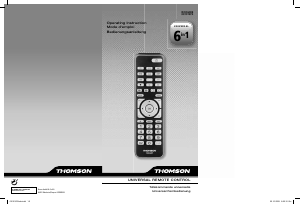
Manual Thomson ROC1128SAM Comando remoto

Precisa de um manual para o seu Thomson ROC1128SAM Comando remoto? Abaixo você pode visualizar e baixar gratuitamente o manual em PDF em português. Este produto tem atualmente 6 perguntas frequentes, 4 comentários e tem 11 votos com uma classificação média do produto de 45/100. Se este não for o manual que você deseja, por favor contacte-nos.

Seu produto está com defeito e o manual não oferece solução? Vá a um Repair Café para obter serviços de reparo gratuitos.

Manual

Loading…
4 5
GB
GB
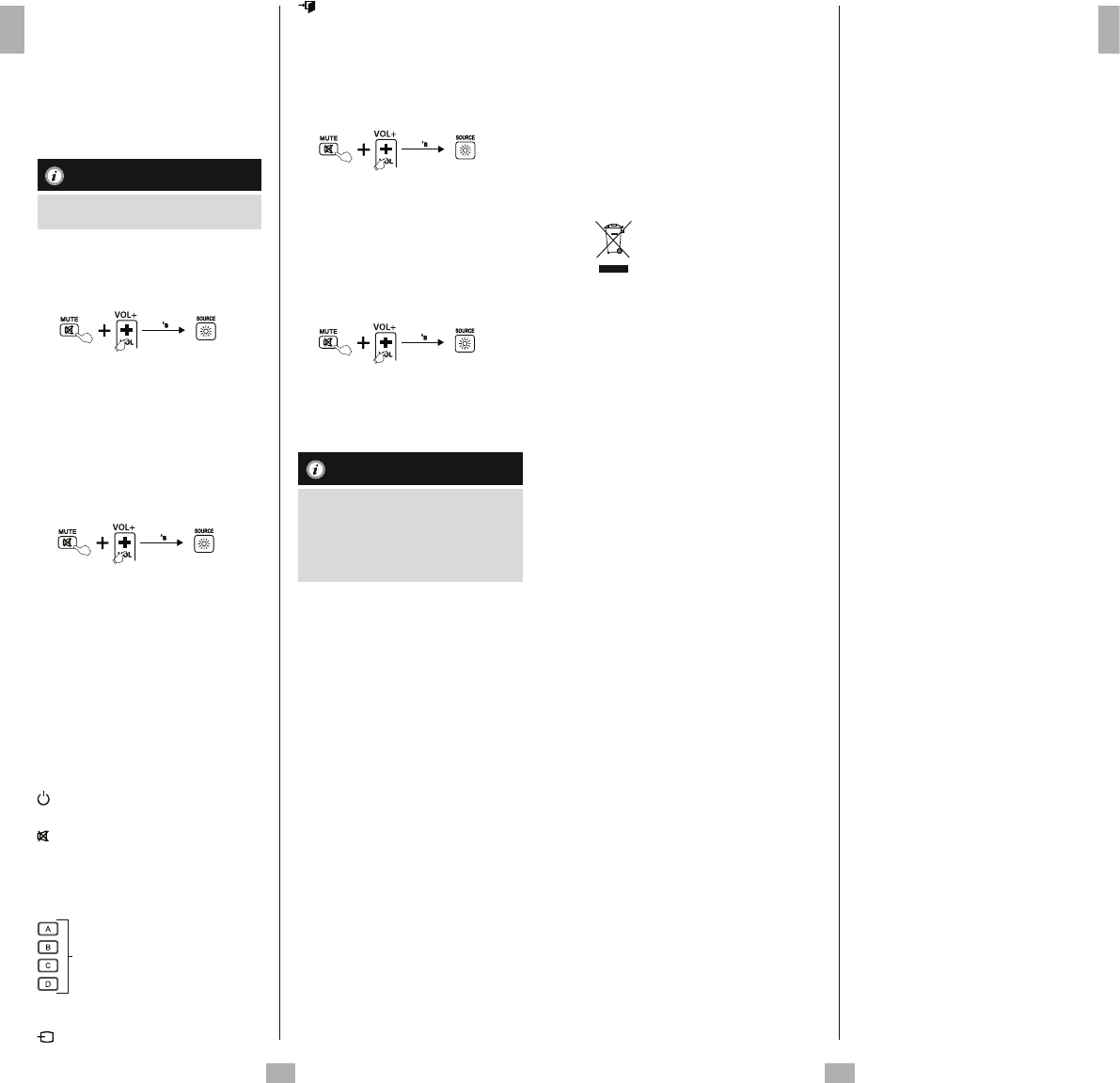
2. Then press and release the target key on
the remote control you want learned.
3. If the LED ashes 3times and then remain
on, the command has been learned
successfully.
4. Repeat these steps to learn other key
functions.
5. Press the [MUTE] and [VOL-] buttons to
save all learnt functions and to exit the
learning mode.

While replacing the batteries, the remote control
will keep the functions of the learned keys.
    
     
1. Press and hold [MUTE] and [VOL+] keys
for 5seconds until the LED will be lit.
5
2. Enter the code [9] [8] [1], the LED will
ash 2times and then remain on.
3. Press and release the desired key at the
replacement remote control which you
want to clear the learned command. If the
LED ashes 3times, the learned command
has been cleared successfully.
     
1. Press and hold [MUTE] and [VOL+] keys for
5seconds until the LED will be lit.
5
1. Enter the code [9] [8] [2], the LED will ash
2times and then remain on.
2. Press and release the [OK] key at the
replacement remote control. If the LED
ashes 3times, all commands have been
cleared successfully.
  
This remote control is equipped with an 
.Thus you could reduce the functionality of
the remote control to its basic functions. It avoids
that the TV Settings arechanged by mistake.
During the   you still could use
following keys:
POWER TV ON /OFF
 Change your TV‘s volume
TV Mute
 Channel up/down
 Numeric keys 0–9toenter channel
numbers

Teletext ON /OFF /MIX
Use to select avariety of on screen
options
 Show the Electronic Program Guide
(if supported by the TV)
Input signal source /Indicator LED
Turn off the menu of the selected
product
 Switch to signal source TV
   
1. Press and hold [MUTE] and [VOL+] keys for
5seconds until the LED will be lit.
5
2. Enter the code [9] [7] [0], the LED will ash
two times and then remain on.
3. Press and release the [OK] key,ifLED ash
3times, you have entered the 
 successfully
   
1. Press and hold [MUTE] and [VOL+]
for 5seconds until the LED will be lit.
5
2. Enter the code [9] [7] [0], the LED will ash
two times and then remain on.
3. Press and release the [EXIT] key,ifLED
ash 3times, you have exit the 
.

While the   is activated only
the keys mentioned in chapter 7. will work.
If one of these keys is pressed the LED will
be lit until the key is released. If one key is
pressed during the normal mode, the LED
will ash.
 
•Donot mix new and used batteries for
powering the Universal Remote Control, as
old batteries tend to leak and may cause
power drain.
•Donot use corrosive or abrasive cleansers on
your Universal Remote Control.
•Keep the Universal Remote Control dust free
by wiping it with asoft, dry cloth.
 
Q. My Universal Remote Control does not
work at all!
A. Check your TV. If the TV main switch is
turned off, your Remote cannot operate
your TV.
A. Check whether your batteries are inserted
properly and are in the correct +/- position.
A. If the batteries are low, replace the
batteries.
Q. My TV responds only to some of the
commands.
A. Try other codes until most keys work
properly.
Q. Some keys of the Remote Control do not
work anymore?
A. Maybe the   had been
activated. Deactivate the   as
explained in chapter 7.2.
  
The manufacturer assumes no liability and
provides no warranty for damage resulting
from improper installation/mounting, improper
use of the product or from failure to observe
the operating instructions and/or safety notes.
   
Please contact Hama Product Consulting if you
have any questions about this product.
Hotline: +49 9091 502-115 (German/English)
Further support information can be found here:
www.hama.com
  
  

After the implementation of the
European Directive 2012/19/EU and
2006/66/EU in the national legal
system, the following applies: Electric and
electronic devices as well as batteries must not
be disposed of with household waste.
Consumers are obliged by law to return
electrical and electronic devices as well as
batteries at the end of their service lives to the
public collecting points set up for this purpose
or point of sale. Details to this are defined by
the national law of the respective country. This
symbol on the product, the instruction manual
or the package indicates that aproduct is
subject to these regulations. By recycling,
reusing the materials or other forms of utilising
old devices/Batteries, you are making an
important contribution to protecting our
environment.
Descarregue o manual em português (PDF, 3.43 MB)
(Considere o meio ambiente e apenas imprima este manual se for realmente necessário)

Loading…

Avaliação

Deixe-nos saber o que você pensa sobre a Thomson ROC1128SAM Comando remoto, deixando uma classificação do produto. Quer compartilhar suas experiências com este produto ou fazer uma pergunta? Por favor, deixe um comentário na parte inferior da página.
Você está satisfeito com Thomson ROC1128SAM Comando remoto?
Sim Não
45%
55%
11 votos

Participe da conversa sobre este produto

Aqui você pode compartilhar o que pensa sobre Thomson ROC1128SAM Comando remoto. Se você tiver alguma dúvida, primeiro leia atentamente o manual. A solicitação de manual pode ser feita através do nosso formulário de contato.

Helmut Wilde 24-09-2020
Se houver teletexto para uma página, por exemplo 1 2 3 4 (subpáginas), como alguém pode colocar isso mais longe.

responder | Isso foi útil (0) (Traduzido pelo Google)
René 10-12-2021
Onde está o botão home desse Thomson roc1128sam?

responder | Isso foi útil (0) (Traduzido pelo Google)
Ovidiu K 28-04-2023
Por que a fonte do manual é tão pequena? Você tem que usar uma lupa para ler as instruções?

responder | Isso foi útil (0) (Traduzido pelo Google)
Gundi und Theo Metzger 16-03-2025
Envie -me uma descrição do controle remoto ROC11285 para [email protected] Obrigado

responder | Isso foi útil (0) (Traduzido pelo Google)

Mais sobre este manual

Entendemos que é bom ter um manual em papel para o seu Thomson ROC1128SAM Comando remoto. Você sempre pode baixar o manual em nosso site e imprimi-lo você mesmo. Se desejar um manual original, recomendamos que entre em contato com Thomson. Eles podem fornecer um manual original. Você está procurando o manual do seu Thomson ROC1128SAM Comando remoto em outro idioma? Escolha o seu idioma preferido em nossa página inicial e pesquise o número do modelo para ver se o temos disponível.

Especificações

Marca Thomson
Modelo ROC1128SAM
Categoria Comandos remotos
Tipo de arquivo PDF
Tamanho do arquivo 3.43 MB

Todos os manuais para Thomson Comandos remotos
Mais manuais de Comandos remotos

Perguntas frequentes sobre Thomson ROC1128SAM Comando remoto

Nossa equipe de suporte pesquisa informações úteis e respostas a perguntas frequentes sobre produtos. Se você encontrar algum dado incorreto em nossas perguntas frequentes, informe-nos usando nosso formulário de contato.

Como faço para conectar um controle remoto universal à minha televisão? Verificado

Para conectar o controle remoto universal, você precisa do número do modelo e da marca do controle remoto e da televisão. Há uma lista de códigos para marcas e números de modelo no manual do controle remoto.

Isso foi útil (7996) Consulte Mais informação

Por que há letras ao lado dos números no controle remoto? Verificado

Algumas configurações da televisão podem exigir que você insira letras. Geralmente, há três letras ou outros caracteres em um botão. Quando a entrada de letras é necessária, você pode pressionar esse botão uma vez para a primeira letra, pressione duas vezes para a segunda letra e pressione 3 vezes para a terceira letra. Desta forma, o texto pode ser escrito com um número mínimo de botões.

Isso foi útil (683) Consulte Mais informação

Meu controle remoto também funcionará em outros modelos de televisão da mesma marca? Verificado

Freqüentemente, o controle remoto de uma televisão também funciona em modelos semelhantes da mesma marca. No entanto, é incomum que funcione em todos os modelos dessa marca. Os controles remotos universais são mais adequados para fazer isso.

Isso foi útil (524) Consulte Mais informação

Qual é o alcance médio de um controle remoto infravermelho? Verificado

Um controle remoto infravermelho médio tinha um alcance de cerca de 3 a 6 metros. Além disso, quanto mais longe estiver o dispositivo, mais difícil será mirar.

Isso foi útil (412) Consulte Mais informação

A bateria do meu dispositivo está oxidada. Ainda posso usá-la com segurança? Verificado

Sim, o dispositivo ainda pode ser usado com segurança. Em primeiro lugar, remova a bateria oxidada. Nunca use as mãos desprotegidas para fazer isso. Em seguida, limpe o compartimento da bateria com um cotonete embebido em vinagre ou suco de limão. Deixe secar e insira novas baterias.

Isso foi útil (372) Consulte Mais informação

Posso deixar uma bateria substituível em um dispositivo por muito tempo? Verificado

Baterias substituíveis podem permanecer em um dispositivo por muito tempo se o dispositivo estiver em uso. Quando um dispositivo está sendo armazenado por um longo período, é aconselhável remover as baterias para evitar a oxidação.

Isso foi útil (271) Consulte Mais informação
Manual Thomson ROC1128SAM Comando remoto

Produtos relacionados

Categorias relacionadas

×
Download