Manual NEC PX-50XM6A PlasmaSync 50XM6 Monitor plasma

Precisa de um manual para o seu NEC PX-50XM6A PlasmaSync 50XM6 Monitor plasma? Abaixo você pode visualizar e baixar gratuitamente o manual em PDF em português. Este produto tem atualmente 2 perguntas frequentes, 0 comentários e tem 0 votos. Se este não for o manual que você deseja, por favor contacte-nos.

Seu produto está com defeito e o manual não oferece solução? Vá a um Repair Café para obter serviços de reparo gratuitos.

Manual

Loading…
En-3
Warning
Not for use in a computer room as defined in the
Standard for the Protection of Electronic Computer/
Data Processing Equipment ANSI/NFPA 75.
This equipment has been tested and found to comply
with the limits for a Class B digital device, pursuant
to Part 15 of the FCC Rules. These limits are
designed to provide reasonable protection against
harmful interference in a residential installation. This
equipment generates, uses, and can radiate radio
frequency energy and, if not installed and used in
accordance with the instructions, may cause harmful
interference to radio communications. However, there
is no guarantee that interference will not occur in a
particular installation. If this equipment does cause
harmful interference to radio or television reception,
which can be determined by turning the equipment
off and on, the user is encouraged to try to correct
the interference by one or more of the following
measures:
Reorient or relocate the receiving antenna.
Increase the separation between the equipment and
receiver.
Connect the equipment into an outlet on a circuit
different from that to which the receiver is connected.
Consult the dealer or an experienced radio / TV
technician for help.
This Class B digital apparatus complies with
Canadian ICES-003.
CAUTION
When disposing of used batteries, please comply
with governmental regulations or environmental
public instruction’s rules that apply in your country/
area.
Disposing of your used
product
EU-wide legislation as implemented in
each Member State requires that used electrical
and electronic products carrying the mark (left)
must be disposed of separately from normal
household waste. This includes plasma monitors
and their electrical accessories. When you dispose
of such products, please follow the guidance of
your local authority and/or ask the shop where you
purchased the product.
After collecting the used products, they are reused
and recycled in a proper way. This effort will help
us reduce the wastes as well as the negative
impact to the human health and the environment
at the minimum level.
The mark on the electrical and electronic products
only applies to the current European Union
Member States.
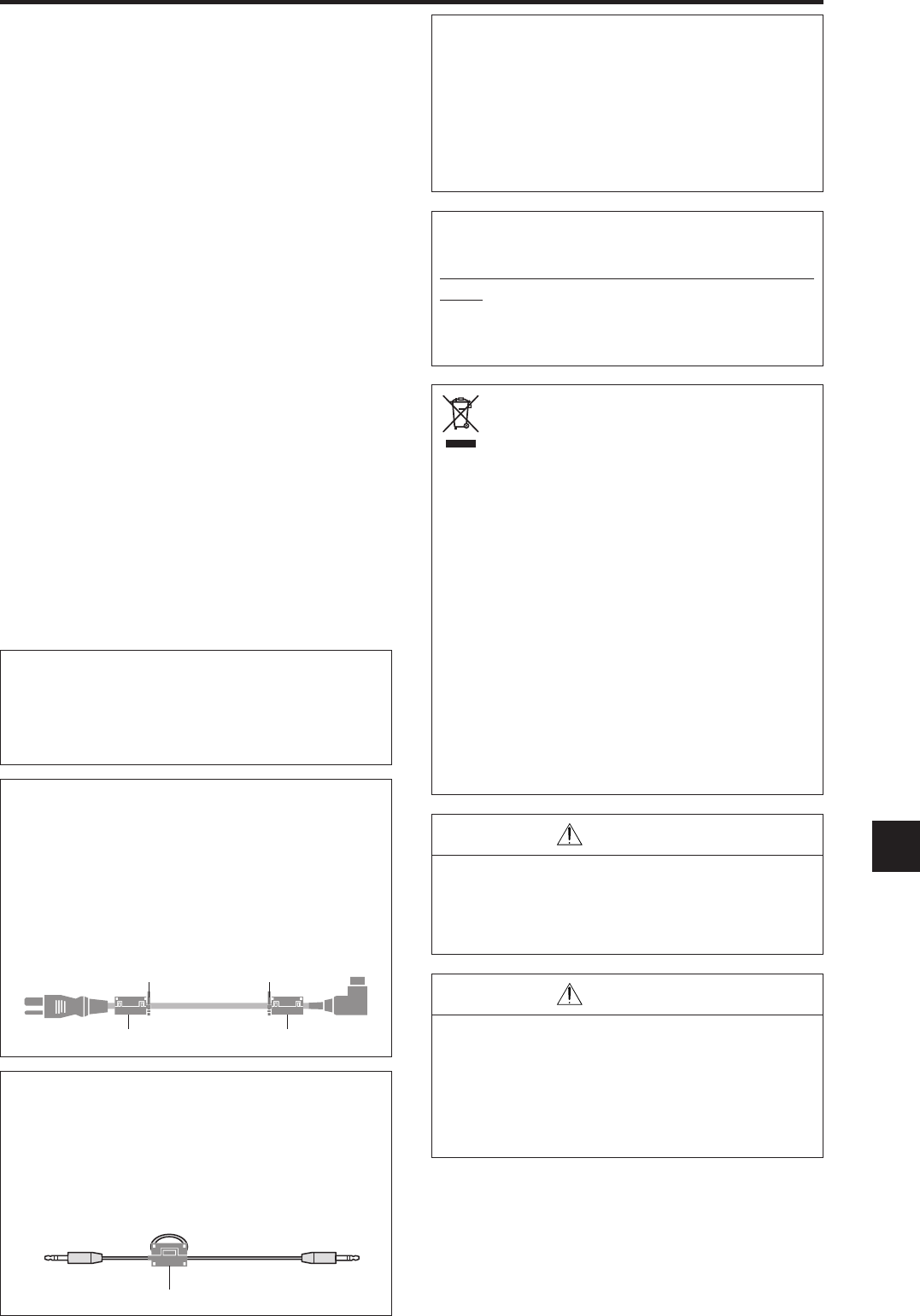
core
Remote cable (not supplied)
To plasma monitor
WARNING
This product equipped with a three-wire grounding
(earthed) plug - a plug that has a third (grounding)
pin. This plug only fits a grounding-type power
outlet. If you are unable to insert the plug into an
outlet, contact a licensed electrician to replace the
outlet with a properly grounded one. Do not defeat
the safety purpose of the grounding plug.
Operating Environment
Operating environment temperature and humidity:
0 °C to +40 °C (+32 °F to +104 °F); less than 80
%RH (cooling vents not blocked)
Do not install this unit in a poorly ventilated area,
or in locations exposed to high humidity or direct
sunlight (or strong artificial light)
NOTE:
When you use the power cable (supplied), use the supplied
ferrite cores. Set the ferrite cores (supplied) on both ends
of the power cable (supplied), and then use the bands
(supplied) to fasten the ferrite cores (supplied) to the power
cable (supplied). If you do not this, this monitor will not
conform to mandatory FCC standards.
Po
w
e
r
cable
(
su
pp
lie
d
)
ba
n
d
ba
n
d
NOTE:
When you use a remote cable (not supplied), use the
supplied ferrite core. Wind the remote cable (not supplied)
around the ferrite core (supplied) once, and then fasten
the catch. If you do not this, this monitor will not conform
to mandatory FCC standards.
NOTE:
When you use an RGB cable (not supplied), use an RGB
cable including the ferrite core (not supplied) on both ends
of the cable. If you do not this, this monitor will not
conform to mandatory FCC standards.
CAUTION
When changing batteries, use only conventional
non-rechageable alkaline or manganese batteries
(2).
Risk of explosion if battery is replaced by an
incorrect type. Dispose of used batteries according
to the institutions.
Descarregue o manual em português (PDF, 6.86 MB)
(Considere o meio ambiente e apenas imprima este manual se for realmente necessário)

Loading…

Avaliação

Deixe-nos saber o que você pensa sobre a NEC PX-50XM6A PlasmaSync 50XM6 Monitor plasma, deixando uma classificação do produto. Quer compartilhar suas experiências com este produto ou fazer uma pergunta? Por favor, deixe um comentário na parte inferior da página.
Você está satisfeito com NEC PX-50XM6A PlasmaSync 50XM6 Monitor plasma?
Sim Não
Seja o primeiro a avaliar este produto
0 votos

Participe da conversa sobre este produto

Aqui você pode compartilhar o que pensa sobre NEC PX-50XM6A PlasmaSync 50XM6 Monitor plasma. Se você tiver alguma dúvida, primeiro leia atentamente o manual. A solicitação de manual pode ser feita através do nosso formulário de contato.

Mais sobre este manual

Entendemos que é bom ter um manual em papel para o seu NEC PX-50XM6A PlasmaSync 50XM6 Monitor plasma. Você sempre pode baixar o manual em nosso site e imprimi-lo você mesmo. Se desejar um manual original, recomendamos que entre em contato com NEC. Eles podem fornecer um manual original. Você está procurando o manual do seu NEC PX-50XM6A PlasmaSync 50XM6 Monitor plasma em outro idioma? Escolha o seu idioma preferido em nossa página inicial e pesquise o número do modelo para ver se o temos disponível.

Especificações

Marca NEC
Modelo PX-50XM6A PlasmaSync 50XM6
Categoria Monitores plasma
Tipo de arquivo PDF
Tamanho do arquivo 6.86 MB

Todos os manuais para NEC Monitores plasma
Mais manuais de Monitores plasma

Perguntas frequentes sobre NEC PX-50XM6A PlasmaSync 50XM6 Monitor plasma

Nossa equipe de suporte pesquisa informações úteis e respostas a perguntas frequentes sobre produtos. Se você encontrar algum dado incorreto em nossas perguntas frequentes, informe-nos usando nosso formulário de contato.

Posso reparar um pixel morto sozinho? Verificado

Há uma diferença entre um pixel morto e um pixel preso. Um pixel preso ainda é colorido e pode ser corrigido aplicando uma leve pressão exatamente no pixel até que ele se restaure. Um pixel morto é sempre preto ou branco e não pode ser reparado por você.

Isso foi útil (0) Consulte Mais informação

Como posso limpar corretamente meu monitor de plasma? Verificado

Desligue a televisão e limpe a poeira e sujeira da tela com um pano de microfibra. Não use papel, isso pode causar arranhões. Não aplique muita pressão ou você pode causar danos aos pixels. Use um detergente especializado ou faça um misturando 1 parte de vinagre com 1 parte de água. Umedeça o pano com o detergente e limpe a tela. Certifique-se de que o pano não esteja muito molhado. Remova as manchas fazendo movimentos rotativos. Seque a tela com um segundo pano de microfibra para evitar listras.

Isso foi útil (0) Consulte Mais informação
Manual NEC PX-50XM6A PlasmaSync 50XM6 Monitor plasma

Produtos relacionados

×
Download