Manual Karlsson KA6124RD Relógio

Precisa de um manual para o seu Karlsson KA6124RD Relógio? Abaixo você pode visualizar e baixar gratuitamente o manual em PDF em português. Este produto tem atualmente 3 perguntas frequentes, 0 comentários e tem 0 votos. Se este não for o manual que você deseja, por favor contacte-nos.

Seu produto está com defeito e o manual não oferece solução? Vá a um Repair Café para obter serviços de reparo gratuitos.

Manual

Loading…

Instruction manual Alarm clock Riqueza | KA6124
OPERATING INSTRUCTIONS
Thank you for your purchase of this LED Cuckoo Alarm Clock.
Please read the following instructions and warnings carefully
before use to ensure the safe and satisfactory operation of this
product.
INSTRUCTIONS FOR USE
FUNCTIONS
Time and Calendar (Year, Month, and Date)
Snooze Cuckoo Alarm
Temperature (in selectable °C/°F format)
Hourly Cuckoo Chime
CONNECTING THE CLOCK
Connect the cable to a 5V adaptor (not included) and the ‘Type C’
DC-5V (5) jack. The time will start from “12:00”.
SETTING THE TIME AND CALENDAR
In the normal time display, press the SET (1) button. The hour
digits will ash. Press the UP (6) or DOWN (7) button to set the
hour. Ensure that AM or PM is set correctly. When PM is selected
in 12-hour format, a ‘PM’ LED (on the top left corner of the time
display) will light up.
Press the SET (1) button again; the minute digits will ash. Press
UP (6) or DOWN (7) to set the minutes. Continue to set the values
in the following sequence: hour, minute, year, month date. Finally,
press SET (1) or MODE (2) to return to the time display.
SETTING THE ALARM
Press and hold the SET (1) button for 3 seconds; the hour digits
will ash. Press UP (6) or DOWN (7) to set the alarm hour, ensuring
AM/PM is correct.
Press SET (1); the minute digits will ash. Use UP (6) or DOWN (7)
to set the alarm minutes.
Press SET (1); “AL --” will ash. Press UP (6) or DOWN (7) to select
“AL on” or “AL --”. “AL on” activates the alarm; “AL --” turns it off.
Press SET (1) or MODE (2) to save the settings and return to the
time display.
TURNING THE SNOOZE ALARM ON/OFF
Press and hold the SET (1) button for 3 seconds, then press it
twice more until “AL --” ashes. Press UP (6) or DOWN (7) to
select “AL on”. Press SET (1) or MODE (2) to return to the time dis-
play. An alarm LED icon (above the colon) will light up to indicate
the alarm is activated. When the alarm sounds, the cuckoo sound
will play from the SPEAKER (8) and the bird will light up.
Press any button (except TEST) on the back of the clock to stop
the alarm temporarily. The alarm will sound again after the snooze
interval. After four snooze cycles, the snooze function will stop
automatically. The default snooze interval is 5 minutes.
If no button is pressed, the alarm sounds once for 14 seconds and
then stops.
OPERATING INSTRUCTIONS
Instrucons for use
1. Funcons
1) Time and Calendar (Year, Month, and Date)
2) Snooze Cuckoo Alarm
3) Temperature (in selectable C/F format)
4) Hourly Cuckoo Chime
2. Connect the cable to a 5V adapter (not included) and the ‘Type C’ DC-5V (5) jack. Time starts from12:00” o’clock.
3. Set the me and calendar
1) In the normal  display, press SET (1) buon, hour digits ash. Press UP (6) or DOWN (7) buon to set the
hour. Take care to set AM or PMcorrectly. When the PM me
is set under 12-hour format, aPM LED
icon (on the top le corner of
2) Press SET (1) buon, minute digits ash. Press UP (6) or DOWN (7) buon to set the minute. Connue to set in
the sequence as: hour -> minute -> year -> month -> date. At last, press SET (1) or MODE (2) 
ill return to the me display.
4. Set the alarm
1) Press and hold SET (1)UP (6) or DOWN (7)

2) Press SET (1)UP (6) or DOWN (7)
3) Press SET (1)UP (6) or DOWN (7)

4) Press SET (1) or MODE (2)
5. Turn the Snooze Alarm ON/OFF
Press and hold SET (1)UP (6) or
DOWN (7) SET (1) or MODE (2)

SPEAKER (8)



Thank you for your purchase of this LED Cuckoo Alarm Clock. Please read the folloing instrucons and arnings
carefully before use to ensure safe and sasfactory operaon of this product.


3) Press and hold SET (1)UP (6) or
DOWN (7), then press SET (1) or MODE (2)

6. Hourly Cuckoo Chime


UP (6) 
at 7:00 am). Press UP (6) or DOWN (7)
MODE (2)

UP (6)SET (1)
UP (6) or DOWN (7) to select “HC --”. “HC on” means Hourly Chime sound is on, “HC --”
Press SET (1) or MODE (2)


7. Temerature Display
The display alternates beteen me and temperature.ress DOWN (7) buon to select
Celsius or Fahrenheit.
UP (6)


MODE (2)
MODE (2)





MODE (2)UP (6) or DOWN
(7)MODE (2)

12. Back-up Cell
CR2032 buon c
ell (not included) is a backeep me ongoing in the eent of blackout or other poer
failure.CELL
compartment (9)
13. TEST (4) 

14. RESET hole (3)
If the clock is dead (the display does not moe) during seng or orking, please use a slim but blunt object (like ball
pen pointer, toothpick etc.) to press this hole, the clock ill return to the inialdisplay.
Warnings:
1. Keep this product aay from any liquids.
2. Please use a so cloth or a paper toel to clean the clock.
3. Do n
ot use any corrosie cleanser or chemical soluons on the clock.
4. Please keep the instrucons paper ell for future use.
5. This product is not a toy. Keep aay from children and animals.
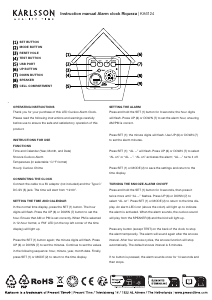
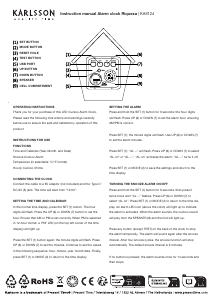
SET BUTTON
MODE BUTTON
RESET HOLE
TEST BUTTON
USB PORT
UP BUTTON
DOWN BUTTON
SPEAKER
CELL COMPARTMENT
Descarregue o manual em português (PDF, 3.29 MB)
(Considere o meio ambiente e apenas imprima este manual se for realmente necessário)

Loading…

Avaliação

Deixe-nos saber o que você pensa sobre a Karlsson KA6124RD Relógio, deixando uma classificação do produto. Quer compartilhar suas experiências com este produto ou fazer uma pergunta? Por favor, deixe um comentário na parte inferior da página.
Você está satisfeito com Karlsson KA6124RD Relógio?
Sim Não
Seja o primeiro a avaliar este produto
0 votos

Participe da conversa sobre este produto

Aqui você pode compartilhar o que pensa sobre Karlsson KA6124RD Relógio. Se você tiver alguma dúvida, primeiro leia atentamente o manual. A solicitação de manual pode ser feita através do nosso formulário de contato.

Mais sobre este manual

Entendemos que é bom ter um manual em papel para o seu Karlsson KA6124RD Relógio. Você sempre pode baixar o manual em nosso site e imprimi-lo você mesmo. Se desejar um manual original, recomendamos que entre em contato com Karlsson. Eles podem fornecer um manual original. Você está procurando o manual do seu Karlsson KA6124RD Relógio em outro idioma? Escolha o seu idioma preferido em nossa página inicial e pesquise o número do modelo para ver se o temos disponível.

Especificações

Marca Karlsson
Modelo KA6124RD
Categoria Relógios
Tipo de arquivo PDF
Tamanho do arquivo 3.29 MB

Todos os manuais para Karlsson Relógios
Mais manuais de Relógios

Perguntas frequentes sobre Karlsson KA6124RD Relógio

Nossa equipe de suporte pesquisa informações úteis e respostas a perguntas frequentes sobre produtos. Se você encontrar algum dado incorreto em nossas perguntas frequentes, informe-nos usando nosso formulário de contato.

O que é um movimento de quartzo? Verificado

Relógios e relógios com movimento de quartzo são acionados por bateria. Isso envia uma corrente elétrica por meio de cristais de quartzo que vibram. Essas vibrações são transmitidas ao movimento. Como as vibrações têm frequência fixa, relógios e relógios com movimento de quartzo são extremamente precisos.

Isso foi útil (94) Consulte Mais informação

O que é GMT? Verificado

GMT significa Greenwich Mean Time (às vezes chamado de UTC, que significa Tempo Universal Coordenado). É a hora da longitude 0, que passa por Greenwich perto de Londres.

Isso foi útil (79) Consulte Mais informação

O que é um 'cronógrafo'? Verificado

Um 'Cronógrafo' é literalmente um 'escritor do tempo'. O termo é usado para descrever relógios que indicam a hora do dia e também medem um determinado período de tempo, como um cronômetro.

Isso foi útil (59) Consulte Mais informação
Manual Karlsson KA6124RD Relógio

Produtos relacionados

Categorias relacionadas

×
Download