
Karlsson is a trademark of Present Time®
Televisieweg 16, 1322 AL, Almere
www.presenttime.com
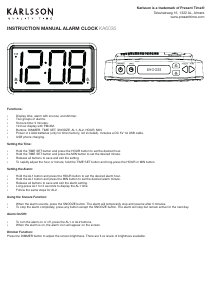
INSTRUCTION MANUAL ALARM CLOCK KA6035
Karlsson is a trademark of Present Time®
Televisieweg 16, 1322 AL, Almere
www.presenttime.com
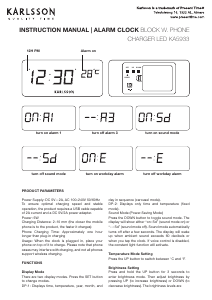
Functions:
• Display time, alarm with snooze, and dimmer.
• Two groups of alarms.
• Snooze time: 5 minutes.
• 12-hour display with PM/AM.
• Buttons: DIMMER, TIME SET, SNOOZE, AL1, AL2, HOUR, MIN.
• Power: 2 x AAA batteries (only for time memory, not included). Includes a DC 5V 1A USB cable.
• USB phone charging.
Setting the Time:
• Hold the TIME SET button and press the HOUR button to set the desired hour.
• Hold the TIME SET button and press the MIN button to set the desired minute.
• Release all buttons to save and exit the setting.
• To rapidly adjust the hour or minute, hold the TIME SET button and long-press the HOUR or MIN button.
Setting the Alarm:
• Hold the AL1 button and press the HOUR button to set the desired alarm hour.
• Hold the AL1 button and press the MIN button to set the desired alarm minute.
• Release all buttons to save and exit the alarm setting.
• Long-press AL1 for 2 seconds to display the AL1 time.
• Follow the same steps for AL2.
Using the Snooze Function:
• When the alarm sounds, press the SNOOZE button. The alarm will temporarily stop and resume after 5 minutes.
• To stop the alarm completely, press any button except the SNOOZE button. The alarm will stop but remain active for the next day.
Alarm On/Off:
• To turn the alarm on or off, press the AL1 or AL2 buttons.
• When the alarm is on, the alarm icon will appear on the screen.
Dimmer Function:
Press the DIMMER button to adjust the screen brightness. There are ve levels of brightness available.
INSTRUCTION MANUAL ALARM CLOCK KA6035
Functions:
• Display time, alarm with snooze, and dimmer.
• Two groups of alarms.
• Snooze time: 5 minutes.
• 12-hour display with PM/AM.
• Buttons: DIMMER, TIME SET, SNOOZE, AL1, AL2, HOUR, MIN.
• Power: 2 x AAA batteries (only for time memory, not included). Includes a DC 5V 1A USB cable.
• USB phone charging.
Setting the Time:
• Hold the TIME SET button and press the HOUR button to set the desired hour.
• Hold the TIME SET button and press the MIN button to set the desired minute.
• Release all buttons to save and exit the setting.
• To rapidly adjust the hour or minute, hold the TIME SET button and long-press the HOUR or MIN button.
Setting the Alarm:
• Hold the AL1 button and press the HOUR button to set the desired alarm hour.
• Hold the AL1 button and press the MIN button to set the desired alarm minute.
• Release all buttons to save and exit the alarm setting.
• Long-press AL1 for 2 seconds to display the AL1 time.
• Follow the same steps for AL2.
Using the Snooze Function:
• When the alarm sounds, press the SNOOZE button. The alarm will temporarily stop and resume after 5 minutes.
• To stop the alarm completely, press any button except the SNOOZE button. The alarm will stop but remain active for the next day.
Alarm On/Off:
• To turn the alarm on or off, press the AL1 or AL2 buttons.
• When the alarm is on, the alarm icon will appear on the screen.
Dimmer Function:
Press the DIMMER button to adjust the screen brightness. There are ve levels of brightness available.


Participe da conversa sobre este produto
Aqui você pode compartilhar o que pensa sobre Karlsson KA6035WH Despertador. Se você tiver alguma dúvida, primeiro leia atentamente o manual. A solicitação de manual pode ser feita através do nosso formulário de contato.