Manual Hitachi UR 18DSL Rádio

Precisa de um manual para o seu Hitachi UR 18DSL Rádio? Abaixo você pode visualizar e baixar gratuitamente o manual em PDF em português. Este produto tem atualmente 2 perguntas frequentes, 0 comentários e tem 3 votos com uma classificação média do produto de 100/100. Se este não for o manual que você deseja, por favor contacte-nos.

Seu produto está com defeito e o manual não oferece solução? Vá a um Repair Café para obter serviços de reparo gratuitos.

Manual

Loading…
6
English
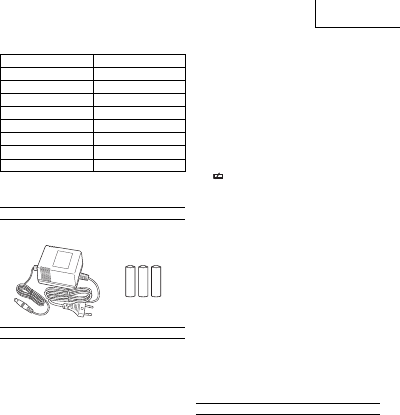
SERVICE TIME PER BATTERY CHARGE
Battery capacity Service time*
1.3 Ah Approx. 7 hours
1.4 Ah Approx. 8 hours
1.5 Ah Approx. 8 hours
2.0 Ah Approx. 11 hours
2.4 Ah Approx. 13 hours
2.6 Ah Approx. 14 hours
3.0 Ah Approx. 17 hours
3.3 Ah Approx. 18 hours
* The service time is approximate (at 2 W × 2 output). It varies
depending on the type of battery, charging condition and
conditions of use.
STANDARD ACCESSORIES
1 AC adapter ....................................................................1
2 AA batteries ..................................................................3
BEFORE USE
Inserting the backup batteries
Inserting backup batteries lets you save the clock setting and
radio station frequencies.
1. Loosen the buckle and open the rear door. The backup
battery box is inside. (Fig. 1)
2. Open the battery box and insert the three AA batteries
provided, making sure they are oriented as illustrated.
CAUTION
Make sure that the batteries are correctly oriented.
Replace all the batteries at the same time. Do not use old
batteries and new batteries at the same time.
Do not discard the batteries with household garbage or
throw them into re.
Attaching the AC Adapter
The provided AC adapter can be used to power the radio
from an electric socket.
Pull back the rubber cover and connect the AC adapter to the
AC adapter terminal. Next, insert the AC adapter power plug
into the electric socket. (Fig. 2)
The AC adapter can be stored inside the top of the rear door.
When storing the AC adapter, secure the it with an elastic
band. (Fig. 3)
NOTE
When the AC adapter and rechargenble battery are used
simultaneously, the AC adapter takes priority. No power
is used from the battery.
The radio has no charging function. The rechargeable
battery is not charged when the AC adapter and battery
are used simultaneously.
Loading the rechargeable battery
CAUTION
When no slide battery is loaded, attach the slide terminal
cover to the terminal to prevent cuts and other injuries
that may result from touching the terminal area.
NOTE
The following batteries are not compatible with this
equipment.
3.6 V, 7.2 V, 10.8 V and 24 V and over
When inserting the battery, do not use unnecessary
force. If the battery does not go in easily, it is not being
inserted correctly.
Check that the battery is correctly oriented and that no
foreign object has been trapped.
The radio has no charging function. Using the AC adapter
and rechargeable battery simultaneously will not charge
the battery.
If
is displayed when you turn the power on with the
rechargeable battery inserted, the battery power is low.
Power the radio from the AC adapter or insert a charged
battery.
Loading a plug-in battery (Fig. 4)
Insert the battery into the space in the radio body as far as it
will go before securing with the belt.
If the belt is not the right length, adjust the length of the belt.
Loading a slide battery (Fig. 5)
Remove the slide terminal cover.
Match the battery with the grooves in the radio body and
insert the battery as far as it will go.
Adjusting the Clock
Adjust the clock with the power turned o .
1. Press and hold the sleep timer/clock button for more than
2 seconds. The “hour” indicator blinks.
Pressing the band selector button in this state switches
between the 12-hour display and 24-hour display.
2. Turn the select dial or press the search button to select
the “hour”.
3. Press the sleep timer/clock button again. The “minutes”
indicator blinks.
4. Turn the select dial or press the search button to select
the “minutes”.
5. Press the sleep timer/clock button again to save the clock
setting.
NOTE
To save the clock setting, the backup batteries must be
installed.
LISTENING TO THE RADIO
CAUTION
Turn down the volume before pressing the power
button.
Failure to do so may result in sudden loud noise and cause
damage to the speakers or lead to hearing impairment.
1. Press the power button to turn on the radio.
2. Press the band select button and select the radio band
(FM or AM).
NOTE
The display changes in the order of [FMAMAUXFM]
each time the band select button is pressed.
3. Select a station using Auto, Manual or Save (Memory).
4. If noise occurs or reception is poor, refer to “For Better
Reception”.
5. Turn the volume dial to adjust the volume.
6. Press the power button to turn o the radio.
000Book̲UR18DSL̲WE.indb6000Book̲UR18DSL̲WE.indb6 2011/10/2614:19:582011/10/2614:19:58
Descarregue o manual em português (PDF, 3.33 MB)
(Considere o meio ambiente e apenas imprima este manual se for realmente necessário)

Loading…

Avaliação

Deixe-nos saber o que você pensa sobre a Hitachi UR 18DSL Rádio, deixando uma classificação do produto. Quer compartilhar suas experiências com este produto ou fazer uma pergunta? Por favor, deixe um comentário na parte inferior da página.
Você está satisfeito com Hitachi UR 18DSL Rádio?
Sim Não
100%
0%
3 votos

Participe da conversa sobre este produto

Aqui você pode compartilhar o que pensa sobre Hitachi UR 18DSL Rádio. Se você tiver alguma dúvida, primeiro leia atentamente o manual. A solicitação de manual pode ser feita através do nosso formulário de contato.

Mais sobre este manual

Entendemos que é bom ter um manual em papel para o seu Hitachi UR 18DSL Rádio. Você sempre pode baixar o manual em nosso site e imprimi-lo você mesmo. Se desejar um manual original, recomendamos que entre em contato com Hitachi. Eles podem fornecer um manual original. Você está procurando o manual do seu Hitachi UR 18DSL Rádio em outro idioma? Escolha o seu idioma preferido em nossa página inicial e pesquise o número do modelo para ver se o temos disponível.

Especificações

Marca Hitachi
Modelo UR 18DSL
Categoria Rádios
Tipo de arquivo PDF
Tamanho do arquivo 3.33 MB

Todos os manuais para Hitachi Rádios
Mais manuais de Rádios

Perguntas frequentes sobre Hitachi UR 18DSL Rádio

Nossa equipe de suporte pesquisa informações úteis e respostas a perguntas frequentes sobre produtos. Se você encontrar algum dado incorreto em nossas perguntas frequentes, informe-nos usando nosso formulário de contato.

O que é DAB+? Verificado

DAB+ é o sucessor do sinal FM e significa "Digital Audio Broadcasting" (radiodifusão sonora digital). Um sinal digital permite ter mais canais para a mesma largura de banda, e facilita a troca entre os canais.

Isso foi útil (302) Consulte Mais informação

Qual é a diferença entre FM e AM? Verificado

FM e AM são formas de modulação usadas para transmitir um sinal. FM significa modulação de frequência e AM significa modulação de amplitude. AM é a forma mais antiga de modulação. A maior diferença é que o sinal FM é muito mais forte do que o sinal AM.

Isso foi útil (243) Consulte Mais informação
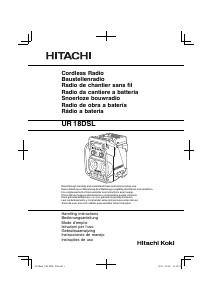
Manual Hitachi UR 18DSL Rádio

Produtos relacionados

Categorias relacionadas

×
Download